- Attach cord into scanner gun then insert USB end into your PC.
- On the start guide poster which comes with scanner, look for section called Miscellaneous Setting and scan SET DEFAULT one time.
- Next look for section called Connect To Host and under USB, scan
HID KEYBOARD EMULATION one time.
- Next look for section called Carriage Return/Line Feed and scan
SCAN OPTIONS, then <DATA><SUFFIX> and then ENTER
one time each.
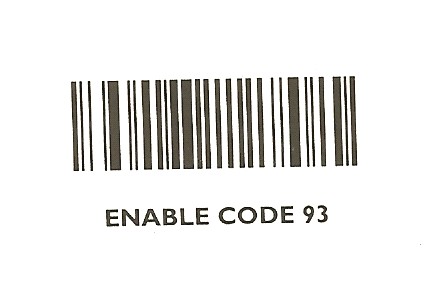
- Look for bar code sheet attached to this doc and scan
DO NOT TRANSMIT UPC-A CHECK DIGIT and
ENABLE CODE 93 one time each.
- Then go into 5.1.8.1 (Barcode Entry) bring up a part# and scan code in the product and save. Then go into POS and you should be able to scan and the same barcode in an order and bring up the product.
* Note if you can not find these bar codes, please call Perfection Software Support.